


When you capture the same person twice
Habsy spots duplicates and lets you decide what to do with each match.
In this article
When you capture someone who is already in your contacts, Habsy shows you the match and lets you choose what to do. It never merges contacts on its own, so nothing is lost without your say.
Where you see it
The capture appears in Drafts as Duplicate Contact Found, with the note Please review your card. Tap View details to open it.
Compare and choose
Duplicate card shows the new scanned card above the existing contact. Under Conflicts Found, each field that differs, such as name, designation, email or website, lists what the contact has now and what the scan would add.
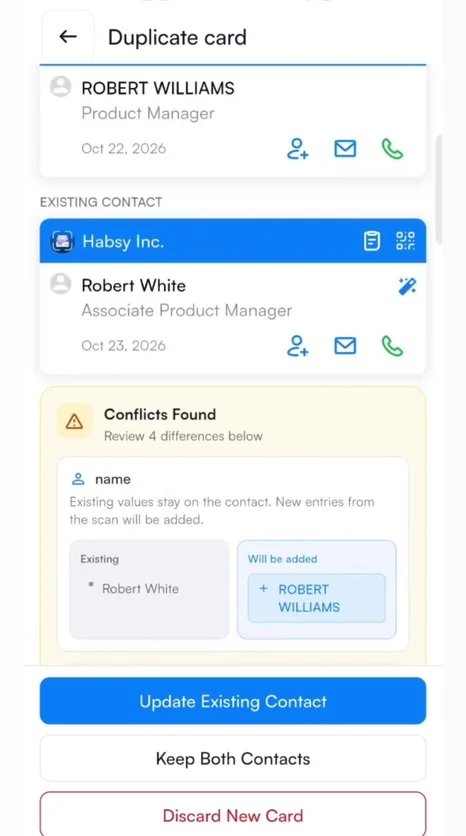
| Update Existing Contact | Keeps the existing contact and adds the new details from the scan. Existing values stay as they are. |
|---|---|
| Keep Both Contacts | Saves the scan as a separate contact. |
| Discard New Card | Deletes the new scan and leaves the existing contact unchanged. |
Related articles
Still need help?
Email us with your account email and a short description of the issue. We reply within 1 to 2 business days.