


View a contact
Everything Habsy keeps on a contact: the card, details, notes, enrichment and where you met.
In this article
Tap any contact on Home to open View Card.
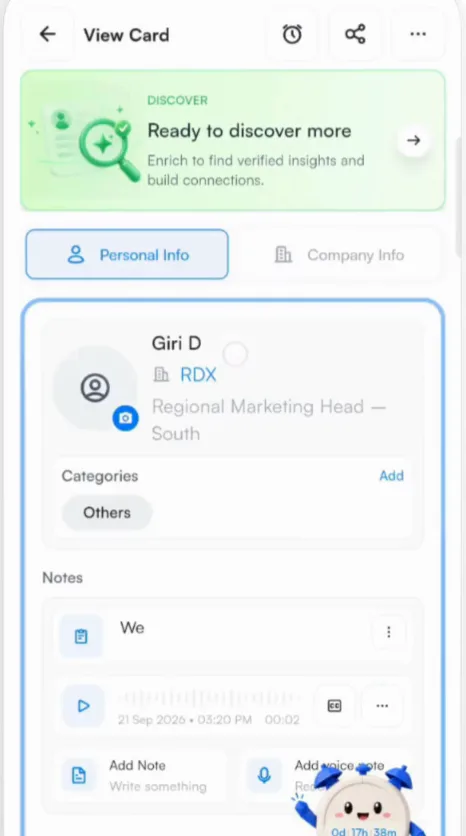
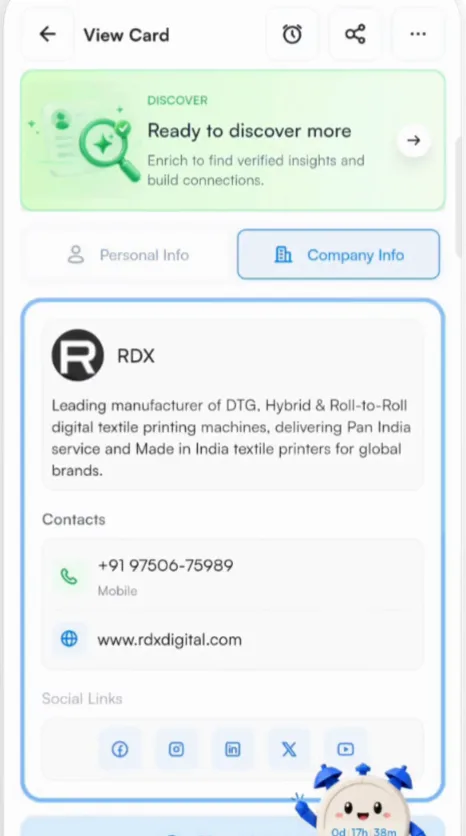
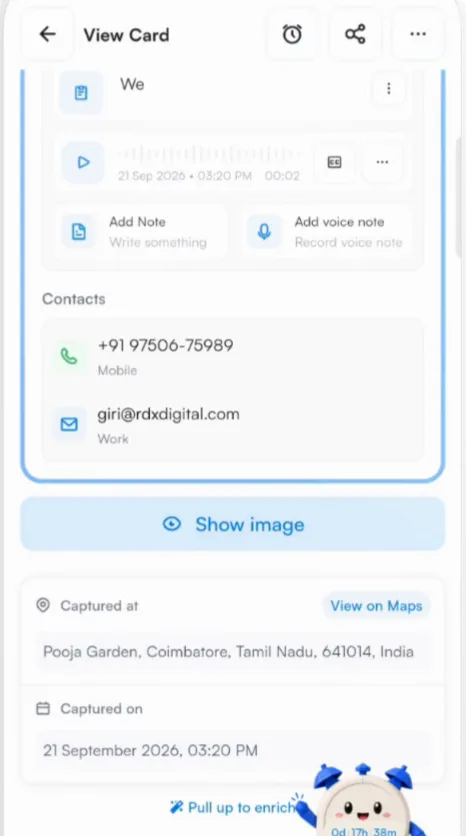
What is on a contact
| Enrichment banner | Ready to discover more starts enrichment for this contact. Once it is done, the banner opens the enrichment brief. See AI enrichment. |
|---|---|
| Personal Info | Name, company, job title, categories, notes and voice notes, and contact details. Tap a phone number or email to use it. |
| Company Info | The company's description, contact details, website and social links. |
| Show image | The original card, front and back. |
| Captured at | Where you scanned the card, with View on Maps. |
| Captured on | The date and time of the scan. |
Buttons at the top
- Reminder icon sets a follow-up reminder. See Reminders.
- Share icon shares the contact.
- More (three dots) has more options for the contact, such as editing it.
Good to know
The location pin and the photo on a contact are part of Habsy Plus.
Related articles
Edit a contactOrganizing contactsLearn more about a contact with AI enrichmentOrganizing contactsAdd notes and voice notesOrganizing contacts
Still need help?
Email us with your account email and a short description of the issue. We reply within 1 to 2 business days.