


Write a follow-up with AI
Describe the message you need and let Habsy draft it, then refine the tone.
Habsy's AI writes a personal email or WhatsApp message from a short prompt. You stay in control of what it says.
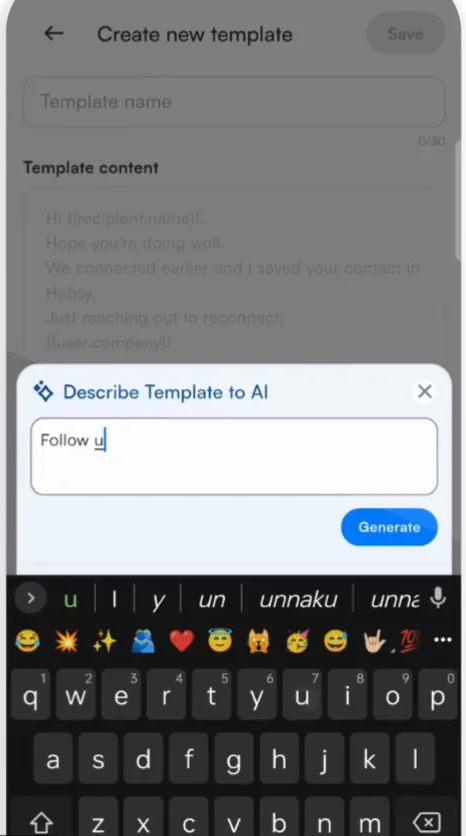
- Start a follow-up and choose Generate with AI, or swipe right on AI assist while writing a template.
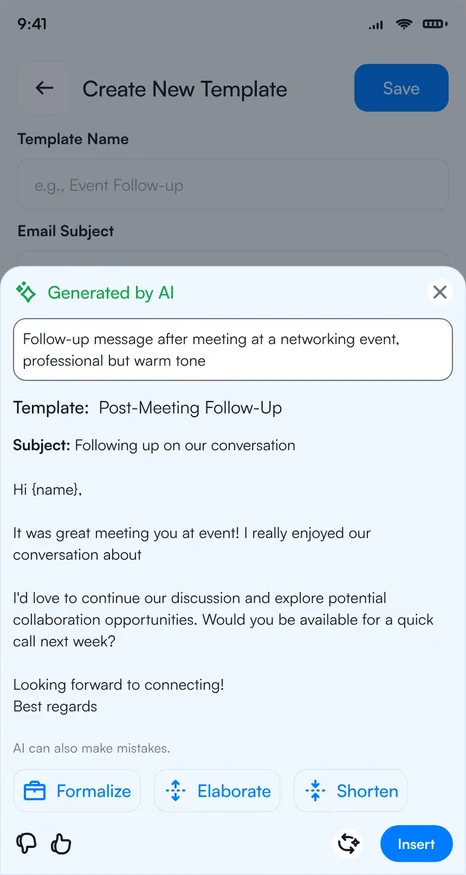
- Describe the message, for example "Follow-up after meeting at a networking event, professional but warm tone".
- Read the draft. Tap Formalize, Elaborate or Shorten to change it.
- Tap Insert to use it, then edit anything you want before sending.
Tip
Mention what you discussed and the next step in your prompt. "Send the price list we discussed and suggest a call next week" gives a better draft than "follow up".
AI can make mistakes, so read the message before you send it.
Related articles
Still need help?
Email us with your account email and a short description of the issue. We reply within 1 to 2 business days.