


Add notes and voice notes
Write a quick note or record what you discussed, and search the transcript later.
In this article
A note tells you, weeks later, what the conversation was about and what you promised. Text notes are free. Voice notes, with transcripts, are part of Habsy Plus.
Add a text note
- On the review screen after a scan, or on any contact, tap Add Note.
- Type the note, for example "Wants a demo for 3 sites in Q3", and save it.
Record a voice note
- Tap Add Voice Note. The first time, allow Habsy to use the microphone.
- Say what you need to remember: their requirements, what you discussed and the next step.
- Tap the tick to save the recording, or the bin to discard it.
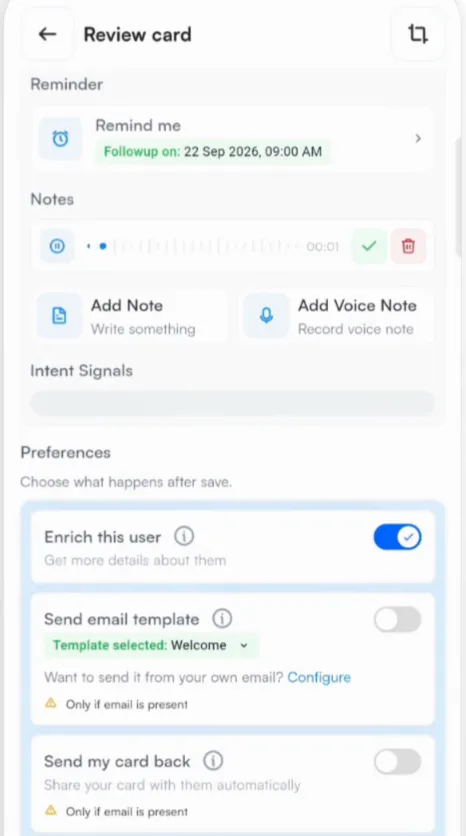
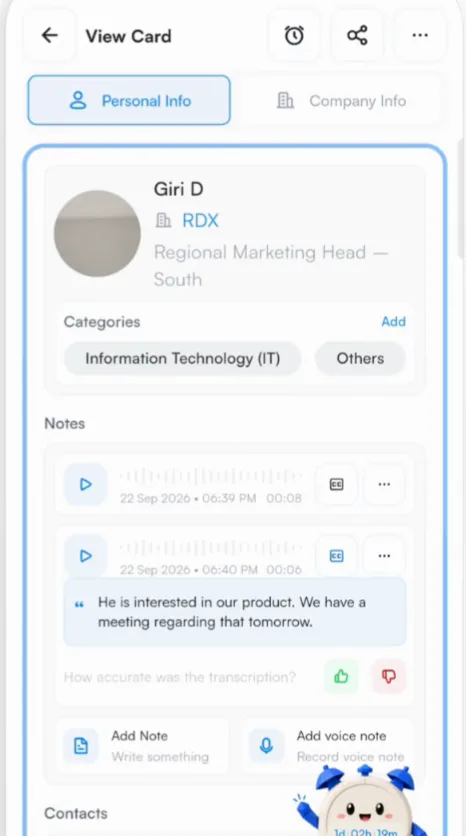
Habsy turns the recording into a searchable transcript and keeps the audio, so you can play it back or search the transcript anytime. Voice notes work in many languages, and the transcript is translated into English where needed. Transcripts are included when you export your contacts.
Tip
Record the voice note before the next conversation starts. Thirty seconds is usually enough.
Related articles
Set follow-up remindersOrganizing contactsView a contactOrganizing contactsLanguages in HabsyGetting started
Still need help?
Email us with your account email and a short description of the issue. We reply within 1 to 2 business days.