


Export your team's contacts
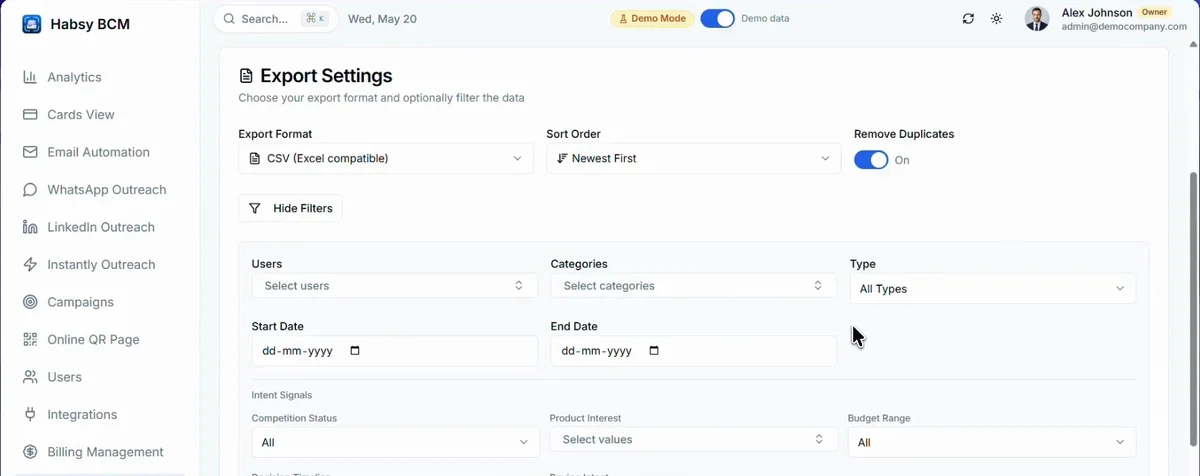
Export contacts to CSV or VCF, filtered by user, category, type, date or intent signal.
Export takes three steps: Configure, Customize Columns, then Review & Export.
- Go to Settings and open Data Export.
- Choose the Export Format: CSV (Excel compatible) or VCF.
- Choose the Sort Order, newest or oldest first, and whether to Remove Duplicates.
- Click Advanced Filters to export only some contacts: by user, category, type, date range or the answers to your intent signals. Habsy shows how many cards will be exported.
- For CSV, choose the columns to include.
- Review your export and download it.
Related articles
Export your contactsExport and integrationsImport contacts into Habsy PlatformHabsy PlatformConnect your CRM and Calendly on Habsy PlatformHabsy Platform
Still need help?
Email us with your account email and a short description of the issue. We reply within 1 to 2 business days.