


See your team's activity in Analytics
Totals, activity over time, top users, categories, card sources and a map of where cards were scanned.
Analytics is the first page you see when you sign in. It shows what your whole team has captured.
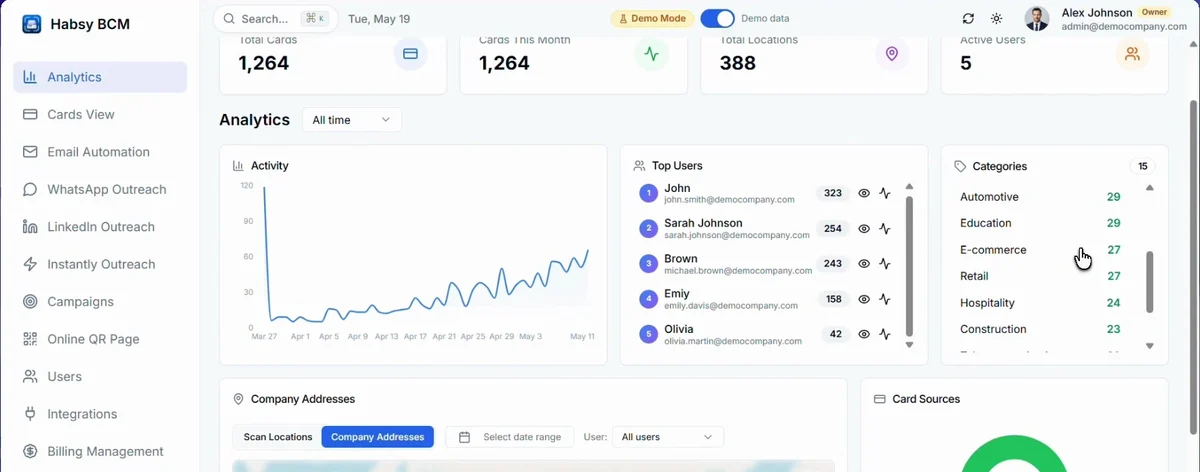
| Totals | Total Cards, Cards This Month, Total Locations and Active Users. |
|---|---|
| Activity | Cards captured over time. Choose the period at the top, such as All time. |
| Top Users | Your reps ranked by the number of cards they captured. Use the icons next to a rep to see more about them. |
| Categories | How many contacts are in each category. |
| Map | Switch between Scan Locations, where cards were scanned, and Company Addresses, where your contacts' companies are. Filter by date range and by user. |
| Card Sources | How contacts were added: scanned, imported, added as a contact or from a QR scan. |
For one event at a time, open the campaign's report. See Read your campaign report.
Related articles
Get started with Habsy PlatformHabsy PlatformInvite teammates and see their activityHabsy PlatformRead your campaign reportHabsy Platform
Still need help?
Email us with your account email and a short description of the issue. We reply within 1 to 2 business days.