


Send WhatsApp messages from Habsy Platform
Go through your contacts one by one with an AI-written WhatsApp message for each.
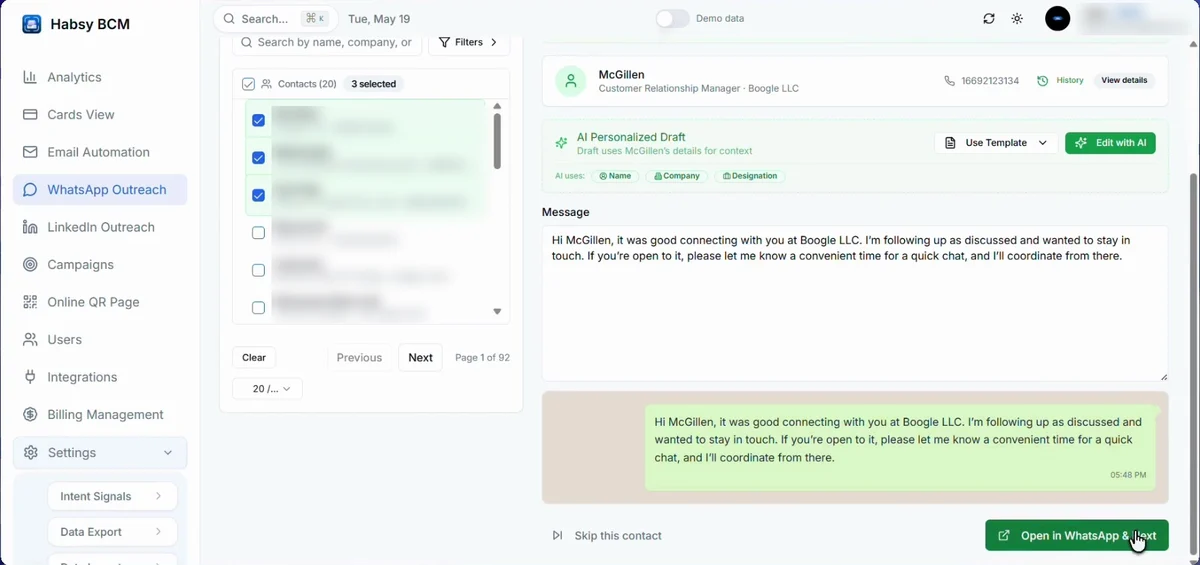
WhatsApp Outreach writes a message for each contact you select, using their name, company and designation, and opens it in WhatsApp ready to send.
- Open WhatsApp Outreach.
- Under Select Recipients, search or filter and tick the contacts you want.
- The first contact opens with an AI Personalized Draft. Change the message, choose Use Template, or click Edit with AI.
- Click Open in WhatsApp & Next. WhatsApp opens with the message filled in, and Habsy moves to the next contact.
- To leave someone out, click Skip this contact.
Edit with AI
Click Edit with AI, describe the message you want and send. Ask the AI to refine, rephrase or adjust it until it reads right, then click Use this draft. Click Start over to begin again.
Save messages you use often on the Templates tab. Messages you have sent are on the History tab.
Good to know
To send WhatsApp messages from Habsy itself, connect your WhatsApp Business account. See Connect WhatsApp.
Related articles
Send emails from Habsy PlatformHabsy PlatformConnect WhatsAppExport and integrationsCreate WhatsApp templatesFollowing up
Still need help?
Email us with your account email and a short description of the issue. We reply within 1 to 2 business days.