


Set intent signals and categories for your team
Create the intent signals and categories every rep sees in the app, and choose the default category.
In this article
Intent signals and categories you set on Habsy Platform apply to your whole team, so every rep records the same things at every event.
Intent signals
Intent signals are the questions your reps answer about each contact, such as budget range or decision timeline. See Intent signals.
- Go to Settings and open Intent Signals.
- Enter a Field Name.
- Choose a Field Type: Select (a list of options), Single Line Text, Multi Line Text or Number.
- Add a Default Value if you want one. This is optional.
- Click Add Field.
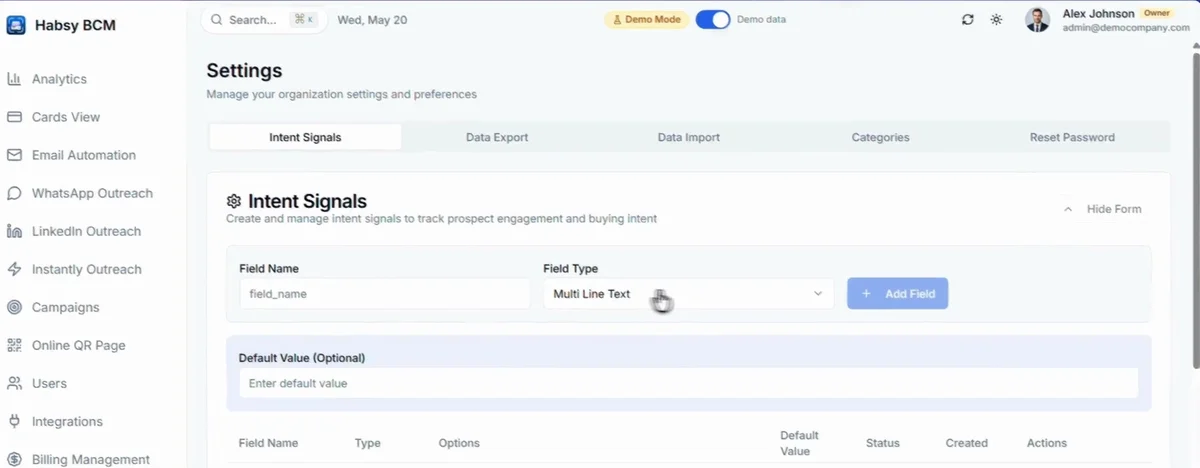
Your intent signals are listed below the form. Use the switch to turn one on or off, or edit or delete it.
Categories
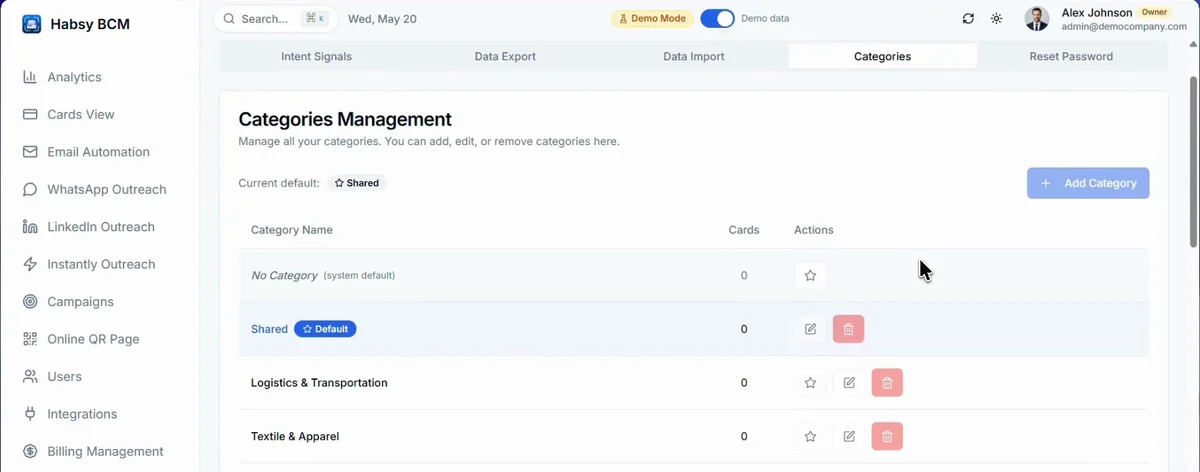
- Go to Settings and open Categories.
- Click Add Category to create one.
- Click the star next to a category to make it the default. New contacts go into the default category.
- Use the pencil to rename a category and the bin to delete it.
Related articles
Qualify contacts with intent signalsOrganizing contactsOrganize contacts with categoriesOrganizing contactsRead your campaign reportHabsy Platform
Still need help?
Email us with your account email and a short description of the issue. We reply within 1 to 2 business days.