


Invite teammates and see their activity
Invite your reps to Habsy Platform and see each rep's cards, QR scans and activity.
In this article
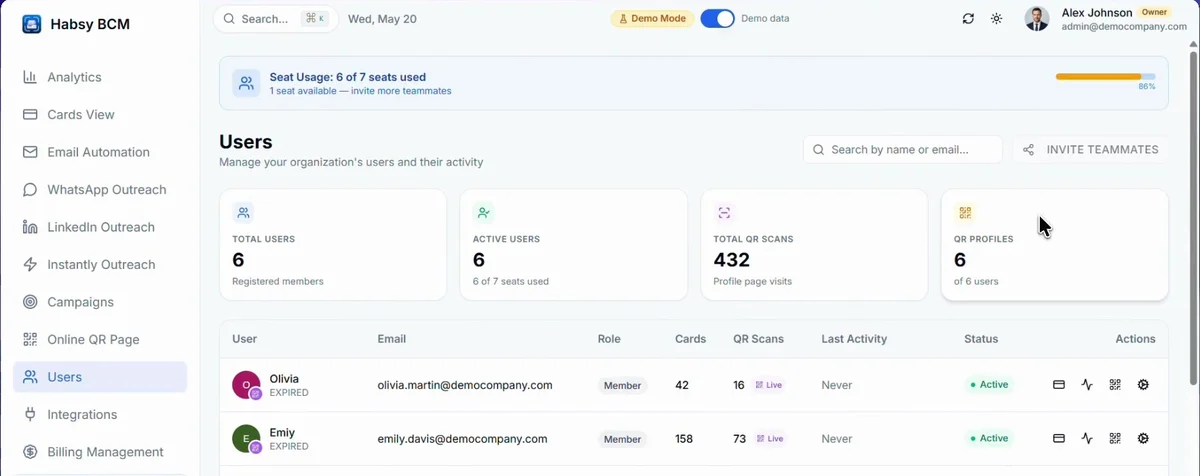
Open Users to see everyone on your team. At the top are your seat usage, your total and active users, total QR scans and QR profiles.
Invite a teammate
- Click Invite teammates.
- Share the invite link or QR code, or enter your teammate's email.
Invites you have sent are listed under Invited teammates. Each teammate uses one seat. If you have no seats left, add more in Billing Management.
See a teammate's activity
The list shows each teammate's email, the number of cards they captured, their QR scans, when they were last active and their status. Use the icons on the right to:
- View Analytics: their cards, locations and categories, and their activity over time.
- QR Profile: their digital card, its scans and where it was scanned, and their enquiry form responses.
Related articles
Add seats and pay for Habsy PlatformHabsy PlatformSee your team's activity in AnalyticsHabsy PlatformAssign a contact to a teammateHabsy Platform
PreviousManage your team's digital cards on Online QR PageNextConnect your CRM and Calendly on Habsy Platform
Still need help?
Email us with your account email and a short description of the issue. We reply within 1 to 2 business days.