


Read your campaign report
The post-event report for each campaign: who you met, how senior they are, their intent and who to follow up first.
Every campaign has its own report, built from the contacts your team captured and the notes and intent signals they added. Open Campaigns, then click Campaign analytics or View on a campaign.
The report opens with a short summary of the event. Click Download Report to save it. It includes:
| Leadership & Access Quality | How many senior people you met (C-level, VP, Director and Manager) and at which companies. |
|---|---|
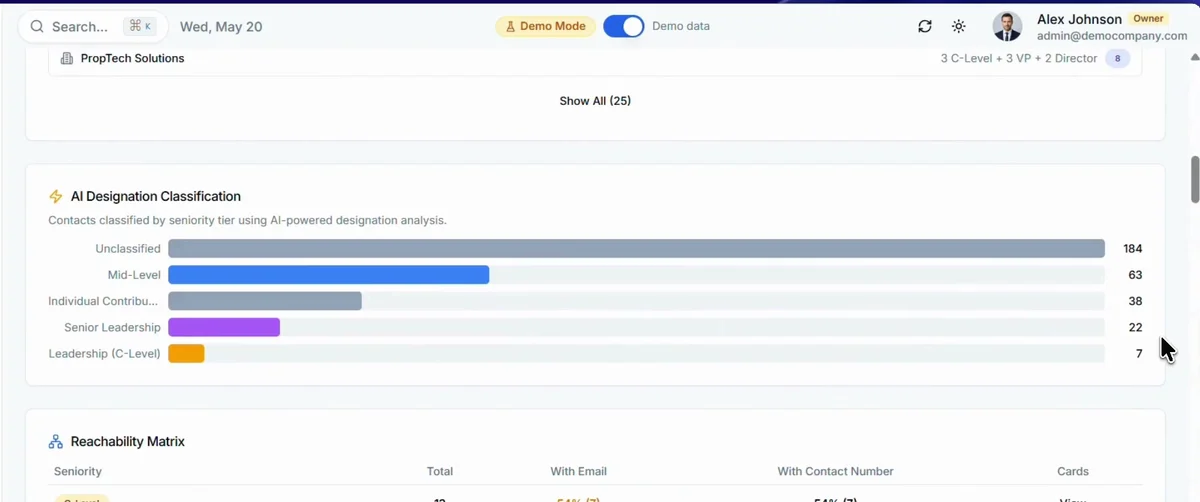
| AI Designation Classification | Your contacts sorted by seniority, read from their job titles. |
| Reachability Matrix | For each level of seniority, how many contacts have an email address or a phone number. |
| Enriched Analysis | Contacts by industry and by country. |
| Intent & Conversation Signals | Buying intent and other signals, taken from the notes your team added to each card. |
| Intent Signal Analysis | A chart for each of your intent signals, such as budget range or decision timeline. |
| Email Outreach Status | How many contacts have been emailed and how many have not, with a button to email the rest. |
| Engagement-ranked contacts | Your contacts ranked by seniority, urgency, engagement and intent, so you know who to follow up first. |
| Key Takeaways | The main opportunities from the event, in a few lines. |
Related articles
Create a campaign for an eventHabsy PlatformQualify contacts with intent signalsOrganizing contactsSend emails from Habsy PlatformHabsy Platform
Still need help?
Email us with your account email and a short description of the issue. We reply within 1 to 2 business days.